Improving my Atari 8-bit Controller Adapter
By Greg Gallardo
Paddle Voltage Divider
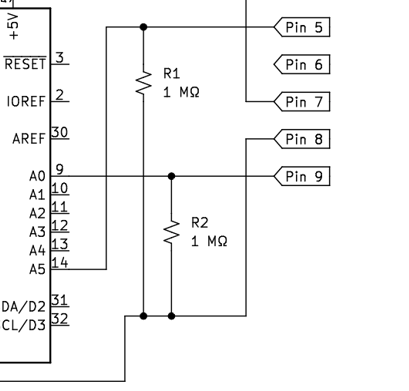
I had based my original circuit on this web page. It uses a voltage divider with a known resistance ( 1 MΩ ) to determine the position of the 1 MΩ potentiometer in each paddle controller. The ADC on the Leonardo read the voltage with analogRead() every loop.
float computePaddle(int val) {
  buffer = val * Vin;
  Vout = (buffer) / 1024.0;
  buffer = (Vin / Vout) - 1;
  return ref * buffer;
}

void loop() {
  rVal = analogRead(PADDLE_1_POT_PIN_9);
  if (rVal) {
    paddle1 = computePaddle(rVal);
  }

  rVal = analogRead(PADDLE_2_POT_PIN_5);
  if (rVal) {
    paddle2 = computePaddle(rVal);
  }

  // scale and translate paddle readings.  (This couild use a proper calibration step)
  float axis_x = -(127.0f * 2.0f * (paddle1 / 700.0f) - 127.0f);
  Joystick.setXAxis(axis_x);

  float axis_y = 127.0f * 2.0f * (paddle2 / 700.0f) - 127.0f;
  Joystick.setYAxis(axis_y);
It worked pretty well for single player game of Super Breakout, but I noticed a problem when using two controllers. As I increased the resistance on one paddle, I could see the readings of the other paddle drop substantially. This is obviously not acceptable for any game using both paddles simultaneously.
I found an atariage.com post that says the original hardware estimated the paddle position by
- Discharging internal 68nF capacitors on the 2600
- Reading how long it took to charge them to a known value.
More googling turned up this page. Which states that the charge time can be found with
t = -ln((Vs-Vc)/Vs)R*C
which works out to -ln((5-1.6)/5)*1000000*0.000000068 = 26.23ms for a 68nF capacitor. This means the 2600 can read paddles ~38 times per second (1000 / 26.23). This is a good speed, but I'm reading two paddles one at a time.
My total read time for both paddles would be less than 30 times a second (assuming other factors are equal.)
I happened to have some 33nF capacitors, when plugged into the equation works out to 78 reads per second.
ln((5-1.6)/5)*1000000*0.000000068 = 12.72ms
So I should be able to do up to 39 reads per second for both paddles. In practice it'll be lower. Some time will be used to get a reading from the pins, discharge the capacitors, and set the joystick buttons.
I changed the circuit to use an RC circuit.
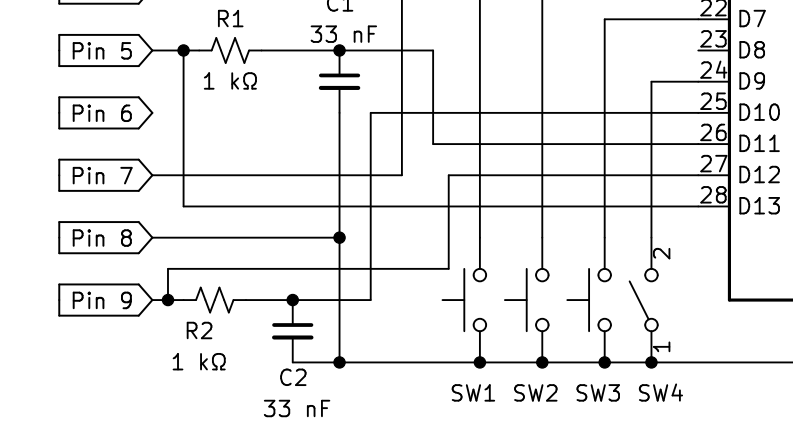
And I now read the paddle values in a while loop. `micros() is used to determine the time it took to charge the capacitor.
  for (int i = 0; i < 2; ++i) {
    pinMode(PADDLE_1_POT_PIN_9 + i, OUTPUT);    // set discharge pin to output
    digitalWrite(PADDLE_1_POT_PIN_9 + i, LOW);       // set discharge pin LOW
    delay(4);                                   // 1 delay seemed sufficient discharge time in tests but went with 4
    pinMode(PADDLE_1_POT_PIN_9 + i, INPUT);        // set the discharge pin to inpt.

    // get the start time
    startTime = micros();
    // read until charged.
    while (digitalRead(PADDLE_1_CAP_PIN_9 + i) < 1)
      ;
    if (i == 0) {
      paddle1 = micros() - startTime;
    } else {
      paddle2 = micros() - startTime;
    }
  }

    float joy1_x = -(127.0f * 2.0f * (paddle1 / 9000.0f) - 127.0f);
    Joystick.setXAxis(joy1_x);
    float joy2_x = -(127.0f * 2.0f * (paddle2 / 9000.0f) - 127.0f);
    Joystick2.setXAxis(joy2_x);
I set pins to OUTPUT and LOW for 4 us to discharge the cap. After that I continuously read the pins until they register as HIGH with digitalRead(). This gets me the charge time of the capacitor in microseconds.
Driving Controller Rotation Speed
My initial attempt at reading the driving controller is based on this description. Their code continuously increases or decreases a counter variable. I can't really use the count of clockwise or counter-clockwise ticks for Atari games. Instead, change the counter into a direction. I set a variable called currentRotationDir to -1 or +1.
 state = !state;
  drivingPin1State = digitalRead(DRIVING_PIN_1);

  // check if pulse occured.
  if (drivingPin1State != lastDrivingPin1State && drivingPin1State == 1) {
    // determine direction
    if (digitalRead(DRIVING_PIN_2) != drivingPin1State) {  // CCW
      currentRotationDir = -1;
    } else {  // CW
      currentRotationDir = 1;
    }
  }

  lastDrivingPin1State = drivingPin1State;
The direction was then used to set the X component of Mouse.Move() by fixed increments.
  digitalWrite(ledPin, state);
  if (currentRotationDir != 0) {
    Mouse.move(currentRotationDir * 7, 0);
    currentRotationDir = 0;
  }
Which does work: 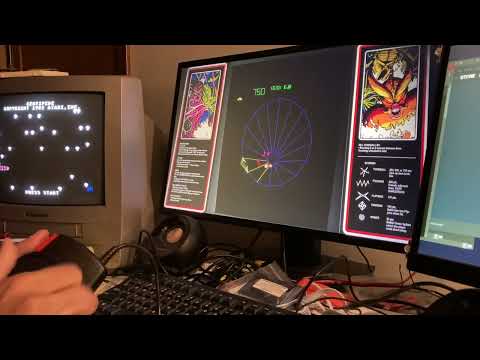
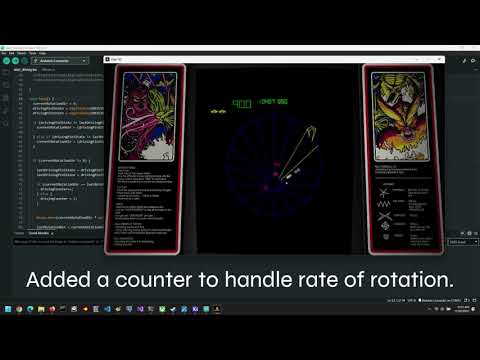
Unfortunately, it doesn't give us the rate at which I rotate the encoder. So the Tempest blaster moves at one speed. This is usable, but not ideal. You want to be able to move blaster at a rate proportional to the rate that you rotate the driving controller.
I'll still keep the direction
  currentRotationDir = 0;
  drivingPin1State = digitalRead(DRIVING_PIN_1);
  drivingPin2State = digitalRead(DRIVING_PIN_2);

  if (drivingPin2State != lastDrivingPin2State) {
    currentRotationDir = (drivingPin2State - lastDrivingPin2State) * (drivingPin1State ? +1 : -1);

  } else if (drivingPin1State != lastDrivingPin1State) {
    currentRotationDir = (drivingPin1State - lastDrivingPin1State) * (drivingPin2State ? -1 : +1);
  }
I add code to count up or down when the rotation direction hasn't changed.
  if (currentRotationDir != 0) {

    lastDrivingPin1State = drivingPin1State;
    lastDrivingPin2State = drivingPin2State;

    if (currentRotationDir == lastRotationDir) {
      drivingCounter++;
    } else {
      drivingCounter = 1;
    }
If the direction does change, I set the counter back down to 1. It also gets set to 1 if the driving controller isn't being turned. This seems to be enough to detect the relative speed of rotation.
The mouse library move() function takes a byte for its move increment. So the most I can change the position by is -128 to 127 units. If the counter is greater than 127, I call Mouse.move() multiple times.
    // Mouse.move has a maximum step size of 127.
    int delta = drivingCounter * drivingScale;
    if (delta < 128) {
      Mouse.move(currentRotationDir * delta, 0);
    } else {
      while (delta > 128) {
        Mouse.move(currentRotationDir * 127, 0);
        delta -= 127;
      }
      Mouse.move(currentRotationDir * delta, 0);
    }

    lastRotationDir = currentRotationDir;
  } else {
    drivingCounter = 1;
  }
With these changes, I can move the blaster quickly or slowly: A better way may be to use a timer to keep track of how many counts occur over some unit of time, but this seems to work well enough for now.