OpenCV/Raspberry Pi Build Notes
By Greg Gallardo
I recently got a Raspberry Pi 5 (4GB). I plan on using it for some light image processing and electronics projects (like my lightgun if I ever get back to it). These notes were from 2022 when I setup a Rasbperry pi 4.
Preparing the Raspberry Pi
The first thing to do is install the Raspberry Pi OS. I used the Raspberry Pi Imager from here to install the 64-bit version of the OS.
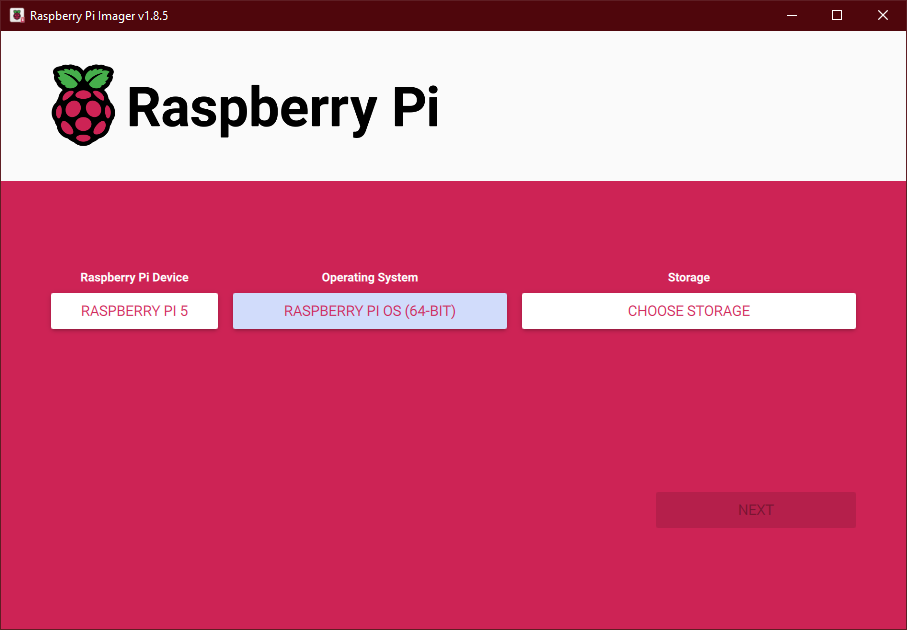
On first boot, do an update
sudo apt update
sudo apt upgrade
sudo reboot
A quick check of the bootloader shows it's up to date
ggallardo@raspberrypi:~ $ rpi-eeprom-update
BOOTLOADER: up to date
   CURRENT: Wed  5 Jun 15:41:49 UTC 2024 (1717602109)
    LATEST: Wed  5 Jun 15:41:49 UTC 2024 (1717602109)
   RELEASE: default (/lib/firmware/raspberrypi/bootloader-2712/default)
            Use raspi-config to change the release.
If it wasn't up to date, it could be upgraded with
sudo rpi-eeprom-update -a
sudo reboot
While I didn't run into any problems with a 4GB Raspberry Pi 5, compiling OpenCV can use a lot of memory. On older (lower memory) systems I had to increase the swap size to complete a build.
CONF_MAXSWAP=4096
to /sbin/dphys-swapfile and /etc/dphys-swapfile then run it
Then reboot
Build and Install OpenCV
Download the OpenCV source code from GitHub and unpack it
curl -LJO https://github.com/opencv/opencv/archive/refs/tags/4.10.0.tar.gz
tar -xvf opencv-4.10.0.tar.gz
I want some of the modules from contrib, so download OpenCV-Contrib source code from GitHub and unpack it
curl -LJO https://github.com/opencv/opencv_contrib/archive/refs/tags/4.10.0.tar.gz
tar -xvf opencv_contrib-4.10.0.tar.gz
Install Build Tools and Dependencies
Build-essential and pkg-config are already present
sudo apt install cmake
sudo apt install libjpeg-dev libpng-dev libtiff-dev libgif-dev
sudo apt install libgstreamer1.0-dev gstreamer1.0-gtk3
sudo apt install libgstreamer-plugins-base1.0-dev gstreamer1.0-gl  libavcodec-dev libavformat-dev  libswscale-dev libv4l-dev
sudo apt install libxvidcore-dev libx264-dev
sudo apt install libgtk-3-dev
sudo apt install libopenblas-dev libatlas-base-dev gfortran libblas-dev liblapack-dev
sudo apt install libjpeg-dev libpng-dev libtiff-dev libgif-dev libgstreamer-plugins-base1.0-dev gstreamer1.0-gl libavcodec-dev libavformat-dev libswscale-dev libv4l-dev libxvidcore-dev libx264-dev libgtk-3-dev libopenblas-dev libatlas-base-dev gfortran libblas-dev liblapack-dev
Configure OpenCV with CMake
Change directories into opencv-4.10.0 and create a build directory
cd opencv-4.10.0
mkdir build
cd build
Then run cmake with the following options
cmake -D CMAKE_INSTALL_PREFIX=/usr/local -D ENABLE_NEON=ON -D WITH_OPENMP=ON -D BUILD_TIFF=ON -D WITH_GSTREAMER=ON -D WITH_V4L=ON -D WITH_LIBV4L=ON -D WITH_VTK=OFF -D OPENCV_ENABLE_NONFREE=ON -D INSTALL_C_EXAMPLES=OFF -D BUILD_opencv_python3=OFF -D BUILD_opencv_python2=OFF -D OPENCV_EXTRA_MODULES_PATH=../../opencv_contrib-4.10.0/modules -D CMAKE_BUILD_TYPE=release ..
More info about the flags are at opencv
compile
make -j4
In the past using 4 processes ( make -j4 ) has always crashed for me (but these were Rpi3's and 4s'.. Usually near the end. Sometimes halfway through the build. 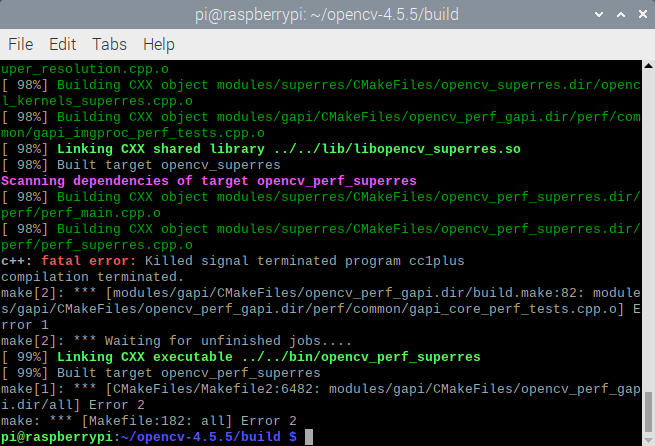
So I've used 3 processes to get most of the build done.
make -j3 # this may crash around 99%
After that build crash, I use a single process to complete the build.
make -j1 # try this if make -j3 crashes
Once the build is complete, install it:
sudo make install
sudo ldconfig
Camera Test
For testing I used a B0165 / OV9281 Monochrom camera module from ArduCamm
I'm primarily interested in grabbing frames from a camera for image processing. I use this code to test my build:
#include <opencv2/opencv.hpp>
#include <iostream>

int main()
{
  // assuming camera 0
  //cv::VideoCapture cap(0);
  cv::VideoCapture cap("libcamerasrc ! video/x-raw,  width=(int)640, height=(int)480, framerate=(fraction)60/1, format=YUY2 ! videoconvert ! videoscale ! appsink", cv::CAP_GSTREAMER);

  if(!cap.isOpened())
  {
    std::cout << "Error opening cv::VideoCapture" << std::endl;
    return -1;
  }

  // set the frame size to 640x480 for speed
  std::cout << "width: " << cap.get( cv::CAP_PROP_FRAME_WIDTH) << "\n";
  std::cout << "height: " << cap.get( cv::CAP_PROP_FRAME_HEIGHT) << "\n";

  // loop forever
  std::cout << "Press 'Q' to quit." << "\n";
  while(1)
  {
    cv::Mat frame;
    cap >> frame;
    if (frame.empty())   {
      break;
    }
    cv::imshow("cam", frame );
    auto key = cv::waitKey(1);
    // q for quit
    if(key == 'q') {
      break;
    } else if ( key == 'w' ) {
      cv::imwrite("out.png", frame);
    }
  }

  // cleanup
  cap.release();
  cv::destroyAllWindows();
  return 0;
}
I use CMake to handle the build flags.
cmake_minimum_required(VERSION 3.10)

# set the project name
project(TestOpenCV)

# setup opencv
find_package( OpenCV REQUIRED )
include_directories( ${OpenCV_INCLUDE_DIR} )

# add the executable
add_executable( testocv test.cpp)

target_link_libraries( testocv ${OpenCV_LIBS} )
Totally workd fine for my LoveRPi OV5647 with IR filter
ggallard@raspberrypi:~ $ libcamera-hello --list
Available cameras
-----------------
0 : ov5647 [2592x1944 10-bit GBRG] (/base/axi/pcie@120000/rp1/i2c@88000/ov5647@36)
    Modes: 'SGBRG10_CSI2P' : 640x480 [58.92 fps - (16, 0)/2560x1920 crop]
                             1296x972 [43.25 fps - (0, 0)/2592x1944 crop]
                             1920x1080 [30.62 fps - (348, 434)/1928x1080 crop]
                             2592x1944 [15.63 fps - (0, 0)/2592x1944 crop]
my B0165 (OV9281) from ArduCam not so much. I had to add
dtoverlay=ov9281????
to /boot/firemware/config.txt
and reboot
ggallard@raspberrypi:~ $ libcamera-hello  --list
Available cameras
-----------------
0 : ov5647 [2592x1944 10-bit GBRG] (/base/axi/pcie@120000/rp1/i2c@88000/ov5647@36)
    Modes: 'SGBRG10_CSI2P' : 640x480 [58.92 fps - (16, 0)/2560x1920 crop]
                             1296x972 [43.25 fps - (0, 0)/2592x1944 crop]
                             1920x1080 [30.62 fps - (348, 434)/1928x1080 crop]
                             2592x1944 [15.63 fps - (0, 0)/2592x1944 crop]

1 : ov9281 [1280x800 10-bit MONO] (/base/axi/pcie@120000/rp1/i2c@80000/ov9281@60)
    Modes: 'R8' : 640x400 [309.79 fps - (0, 0)/1280x800 crop]
                  1280x720 [171.79 fps - (0, 0)/1280x720 crop]
                  1280x800 [143.66 fps - (0, 0)/1280x800 crop]
           'R10_CSI2P' : 640x400 [247.83 fps - (0, 0)/1280x800 crop]
                         1280x720 [137.42 fps - (0, 0)/1280x720 crop]
                         1280x800 [114.93 fps - (0, 0)/1280x800 crop]
sadly getting errors
ggallard@raspberrypi:~/camera_test/build $ ./testocv
call Video Capture
[7:20:20.315922871] [3054]  INFO Camera camera_manager.cpp:313 libcamera v0.1.0+417-e0a93d12-dirty (2024-06-18T07:52:30+01:00)
[7:20:20.323682374] [3057]  INFO RPI pisp.cpp:695 libpisp version v1.0.6 b567f0455680 17-06-2024 (10:20:00)
[7:20:20.324483172] [3057]  WARN CameraSensorProperties camera_sensor_properties.cpp:286 No static properties available for 'ov9281'
[7:20:20.324493820] [3057]  WARN CameraSensorProperties camera_sensor_properties.cpp:288 Please consider updating the camera sensor properties database
[7:20:20.333304788] [3057]  INFO RPI pisp.cpp:1155 Registered camera /base/axi/pcie@120000/rp1/i2c@80000/ov9281@60 to CFE device /dev/media0 and ISP device /dev/media2 using PiSP variant BCM2712_C0
[7:20:20.333839975] [3059]  WARN V4L2 v4l2_pixelformat.cpp:344 Unsupported V4L2 pixel format RPBP
0:00:00.084788895  3054 0x555595ad5360 WARN                 default gstlibcamera-utils.cpp:342:gst_libcamera_stream_formats_to_caps: Unsupported DRM format R16
0:00:00.084807469  3054 0x555595ad5360 WARN                 default gstlibcamera-utils.cpp:342:gst_libcamera_stream_formats_to_caps: Unsupported DRM format BA10
0:00:00.084812654  3054 0x555595ad5360 WARN                 default gstlibcamera-utils.cpp:342:gst_libcamera_stream_formats_to_caps: Unsupported DRM format GB10
0:00:00.084817061  3054 0x555595ad5360 WARN                 default gstlibcamera-utils.cpp:342:gst_libcamera_stream_formats_to_caps: Unsupported DRM format BG10
0:00:00.084821172  3054 0x555595ad5360 WARN                 default gstlibcamera-utils.cpp:342:gst_libcamera_stream_formats_to_caps: Unsupported DRM format RG10
0:00:00.084847358  3054 0x555595ad5360 WARN                 default gstlibcamera-utils.cpp:342:gst_libcamera_stream_formats_to_caps: Unsupported DRM format BA12
0:00:00.084852784  3054 0x555595ad5360 WARN                 default gstlibcamera-utils.cpp:342:gst_libcamera_stream_formats_to_caps: Unsupported DRM format GB12
0:00:00.084856969  3054 0x555595ad5360 WARN                 default gstlibcamera-utils.cpp:342:gst_libcamera_stream_formats_to_caps: Unsupported DRM format BG12
0:00:00.084860876  3054 0x555595ad5360 WARN                 default gstlibcamera-utils.cpp:342:gst_libcamera_stream_formats_to_caps: Unsupported DRM format RG12
0:00:00.084896765  3054 0x555595ad5360 WARN                 default gstlibcamera-utils.cpp:342:gst_libcamera_stream_formats_to_caps: Unsupported DRM format BYR2
0:00:00.084901765  3054 0x555595ad5360 WARN                 default gstlibcamera-utils.cpp:342:gst_libcamera_stream_formats_to_caps: Unsupported DRM format BYR2
0:00:00.084906191  3054 0x555595ad5360 WARN                 default gstlibcamera-utils.cpp:342:gst_libcamera_stream_formats_to_caps: Unsupported DRM format BA14
0:00:00.084910062  3054 0x555595ad5360 WARN                 default gstlibcamera-utils.cpp:342:gst_libcamera_stream_formats_to_caps: Unsupported DRM format GB14
0:00:00.084914395  3054 0x555595ad5360 WARN                 default gstlibcamera-utils.cpp:342:gst_libcamera_stream_formats_to_caps: Unsupported DRM format BG14
0:00:00.084918265  3054 0x555595ad5360 WARN                 default gstlibcamera-utils.cpp:342:gst_libcamera_stream_formats_to_caps: Unsupported DRM format RG14
0:00:00.084959265  3054 0x555595ad5360 WARN                 default gstlibcamera-utils.cpp:342:gst_libcamera_stream_formats_to_caps: Unsupported DRM format YU24
0:00:00.084964543  3054 0x555595ad5360 WARN                 default gstlibcamera-utils.cpp:342:gst_libcamera_stream_formats_to_caps: Unsupported DRM format YV24
0:00:00.084969228  3054 0x555595ad5360 WARN                 default gstlibcamera-utils.cpp:342:gst_libcamera_stream_formats_to_caps: Unsupported DRM format GB16
0:00:00.084973191  3054 0x555595ad5360 WARN                 default gstlibcamera-utils.cpp:342:gst_libcamera_stream_formats_to_caps: Unsupported DRM format GB16
0:00:00.084977210  3054 0x555595ad5360 WARN                 default gstlibcamera-utils.cpp:342:gst_libcamera_stream_formats_to_caps: Unsupported DRM format GR16
0:00:00.084981154  3054 0x555595ad5360 WARN                 default gstlibcamera-utils.cpp:342:gst_libcamera_stream_formats_to_caps: Unsupported DRM format GR16
0:00:00.085001562  3054 0x555595ad5360 WARN                 default gstlibcamera-utils.cpp:342:gst_libcamera_stream_formats_to_caps: Unsupported DRM format YV16
0:00:00.085006840  3054 0x555595ad5360 WARN                 default gstlibcamera-utils.cpp:342:gst_libcamera_stream_formats_to_caps: Unsupported DRM format RGB6
0:00:00.085011266  3054 0x555595ad5360 WARN                 default gstlibcamera-utils.cpp:342:gst_libcamera_stream_formats_to_caps: Unsupported DRM format RGB6
0:00:00.085015340  3054 0x555595ad5360 WARN                 default gstlibcamera-utils.cpp:342:gst_libcamera_stream_formats_to_caps: Unsupported DRM format BG48
0:00:00.085019395  3054 0x555595ad5360 WARN                 default gstlibcamera-utils.cpp:342:gst_libcamera_stream_formats_to_caps: Unsupported DRM format RG48
[7:20:20.335426128] [3059] ERROR Camera camera.cpp:1171 Can't configure camera with invalid configuration
0:00:00.086301325  3054 0x555595ad5360 WARN            libcamerasrc gstlibcamerasrc.cpp:447:gst_libcamera_src_negotiate:<libcamerasrc0> error: Failed to configure camera: Invalid argument
0:00:00.086308102  3054 0x555595ad5360 WARN            libcamerasrc gstlibcamerasrc.cpp:447:gst_libcamera_src_negotiate:<libcamerasrc0> error: Camera::configure() failed with error code -22
0:00:00.086341473  3054 0x555595ad5360 WARN            libcamerasrc gstlibcamerasrc.cpp:646:gst_libcamera_src_task_enter:<libcamerasrc0> error: Internal data stream error.
0:00:00.086346399  3054 0x555595ad5360 WARN            libcamerasrc gstlibcamerasrc.cpp:646:gst_libcamera_src_task_enter:<libcamerasrc0> error: streaming stopped, reason not-negotiated (-4)
[ WARN:0@0.088] global cap_gstreamer.cpp:2839 handleMessage OpenCV | GStreamer warning: Embedded video playback halted; module libcamerasrc0 reported: Failed to configure camera: Invalid argument
[ WARN:0@0.088] global cap_gstreamer.cpp:1698 open OpenCV | GStreamer warning: unable to start pipeline
[ WARN:0@0.088] global cap_gstreamer.cpp:1173 isPipelinePlaying OpenCV | GStreamer warning: GStreamer: pipeline have not been created
[ WARN:0@0.088] global cap.cpp:204 open VIDEOIO(GSTREAMER): backend is generally available but can't be used to capture by name
Check if Video Capture is opened
Error opening cv::VideoCapture
at the end of the day, I needed to change the format